Hot desking

With BLDNG's hot desking solution, employees book the desk they need, when they need it. And you get data showing how the office is actually used.

Long row of flexible workstations in an open-plan office with some desks empty and others in use — illustrating the need for a hot desking solution

Give employees the freedom to choose their workspace

Hot desking gives employees the freedom to sit where it suits them best, near the team, in a quiet zone, or by the window.

For hybrid teams, it means there's always a desk available on the days you're in the office. And for managers, it means real insight into how many desks are actually needed.

What sets BLDNG apart from pure booking systems is that we combine booking data with physical sensor data. You see not just who booked, but who actually showed up. That gives you workplace analytics based on reality, not assumptions.

Why fixed desks don't work

47%
Max average office utilization
3-5K
NOK per sqm per year in wasted lease
53%
Capacity sitting unused on average

How does it work?

From app to insights — four simple steps.

1

Open the app

Employees open the BLDNG.app and see the floor plan with real-time availability - green is free, red is occupied.


2

Book a desk

Choose a desk, zone, or floor. The booking syncs automatically with the Microsoft 365 calendar. 

3

Sensors confirm

Occupancy sensors detect whether someone is actually sitting at the desk. If nobody shows up, the desk is automatically released for others.

4

Insights in BLDNG.hub

Managers get dashboards in BLDNG.hub with occupancy, no-show rates, and trends - so you can match desk count to actual demand.

Benefits of hot desking

Hot desking isn't just about saving desks - it's about using the office smarter. Here are the key benefits.

Rolled architectural blueprint with teal ribbon — symbolizing smart space planning with a hot desking solution

Reduce unused space

When employees book desks on demand, you need fewer desks than headcount. Freed-up space can be used for collaboration zones or quiet rooms.

Laptop with teal charging cable — symbolizing flexible hybrid work with hot desking

Support hybrid work models

Employees working from home part of the week don't need a fixed desk. Hot desking makes hybrid work work without excess space.

Stack of Post-it notes with pen — symbolizing collaboration and the find-a-colleague feature in hot desking

Better cross-team collaboration

Hot desking lets employees sit near the people they're working with that day. Break down silos and make cross-functional collaboration easier.

Physical bar chart of wooden blocks — symbolizing data-driven space decisions with hot desking

Data-driven space decisions

See which zones are most popular, which floors are underused, and what the ratio between bookings and actual attendance is - in real time.

Empty office chair with teal seat — symbolizing no-show detection with BLDNG sensors in hot desking

No-show detection

What sets BLDNG apart from pure booking software: sensors confirm whether someone is actually at the desk. No-shows are logged automatically.

Succulent plant in teal ceramic pot — symbolizing happier employees and personal workspace in hot desking

Happier employees

Employees who can choose their workspace often report higher satisfaction. Everyday autonomy leads to a better work experience.
Powered by BLDNG.hub

Insights through BLDNG.hub

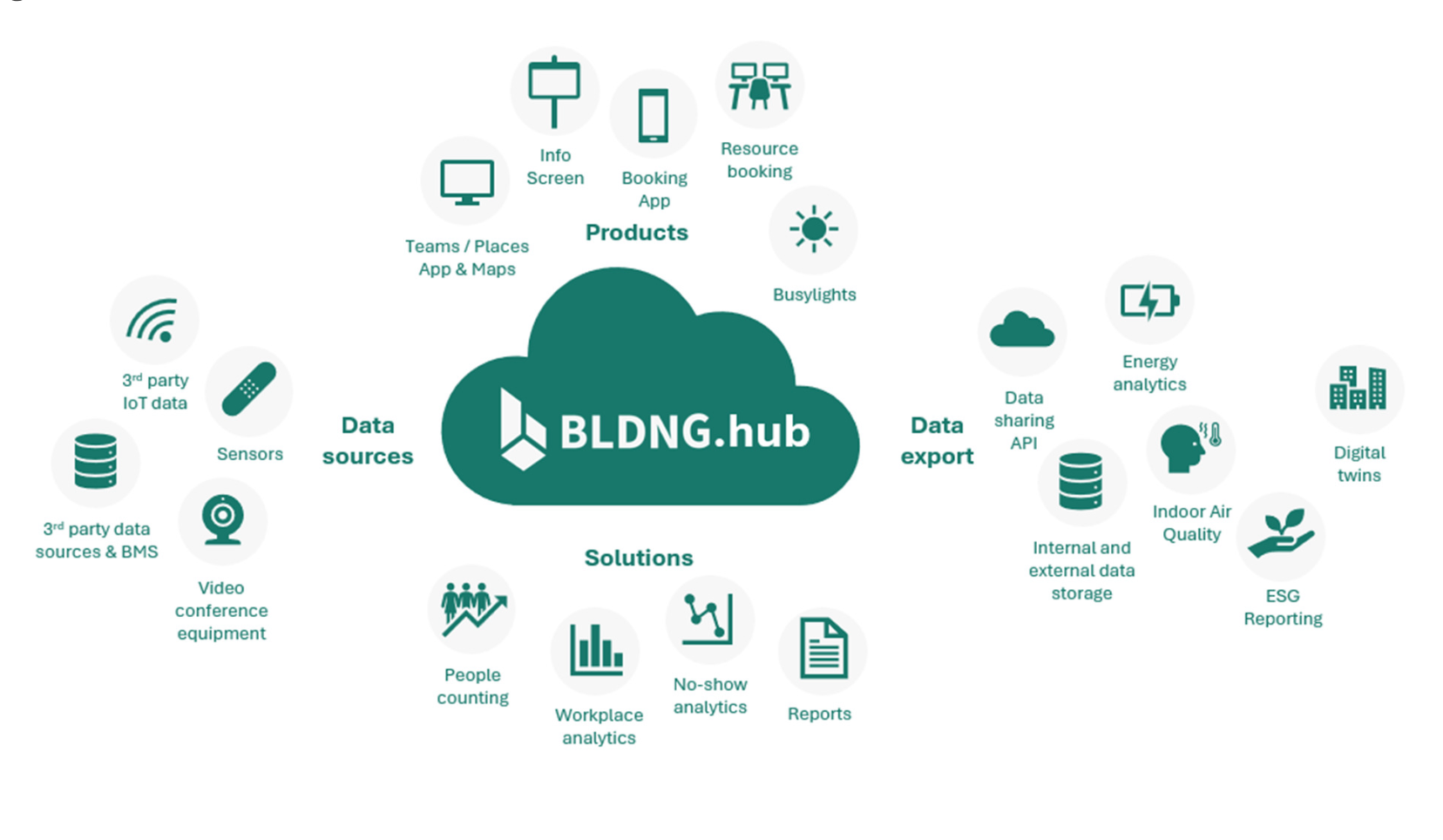
All booking and sensor data is collected in BLDNG.hub. The platform gives you a complete picture of desk usage.

  • ✓ Occupancy per desk, zone, floor, and building
  • ✓ No-show rates: how often booked desks sit empty
  • ✓ Trends and peak times for smarter space planning
  • ✓ Data exportable via API for integration with other systems

Learn more about BLDNG.hub ➢

BLDNG.hub architecture diagram

How can BLDNG help?

1

Needs analysis

We map the office, work patterns, and which zones are suited for flexible desk use.

2

Setup & integration

The BLDNG.App is configured with floor plans, zone assignments, and M365 integration. Sensors are installed where needed.

3

Rollout

Employees get access to the app and can start booking desks from day one. Training is minimal - the app is intuitive.

4

Insights & optimization

After a few weeks, you see trends in BLDNG.hub: occupancy, no-show rates, peak times. You can adjust desk count and zones based on facts.

Ready for hot desking?

See how BLDNG can help you enable flexible desk booking.

Book a free demo.